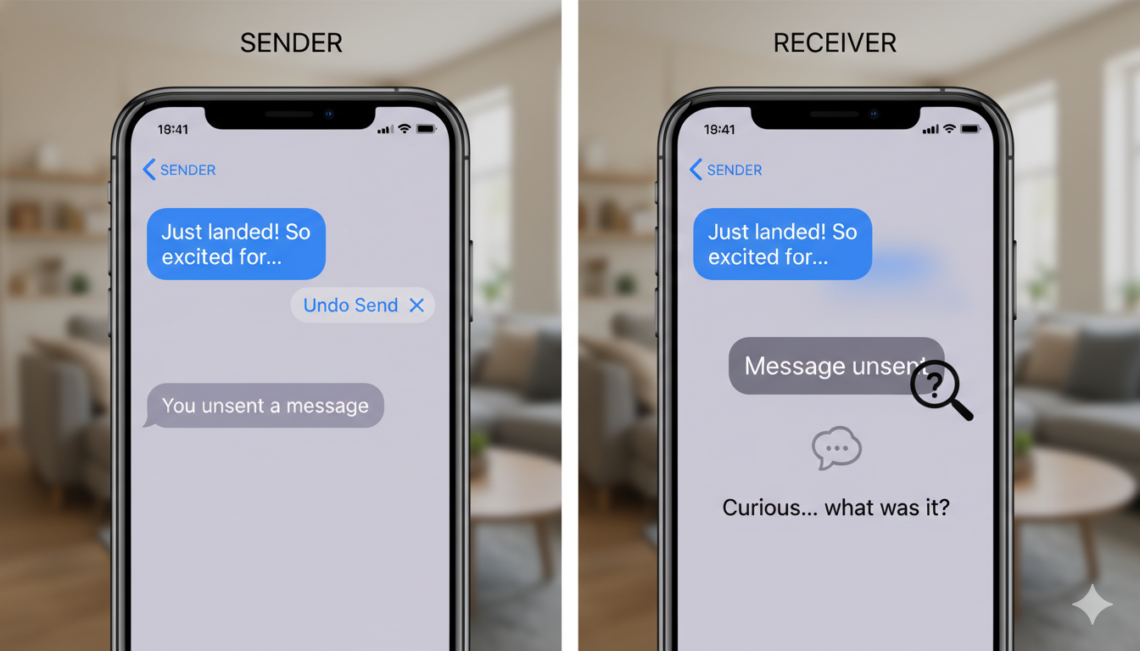
It happens to everyone at least once. You tap send on a text, but instantly regret your words. Luckily, Apple added a feature to undo sends. However, this raises a big question for the receiver. Many people often ask, how to see an unsent message on iphone when they notice a gap in their chat history. It is natural to feel curious when a bubble disappears. We want to know if there is a secret trick to peek at what was hidden. Let’s look at how these iMessage tools actually work for you.
Understanding How Apple’s Undo Send Works
When someone chooses to retract a text, Apple removes it from your view. The system is designed to provide privacy for the sender. If you are wondering can you see an unsent message on iphone, the short answer is usually no. Once the sender hits that button, the text vanishes from the chat thread. It does not stay hidden in a secret folder or a background app. The software clears it from your device completely to ensure the sender’s choice is respected. This is a standard part of modern messaging safety and privacy controls.
Can Someone See Unsent Message on iPhone After It Is Gone?
Privacy is a top priority for smartphone users today. If you are searching for how to see an unsent message, you might feel frustrated by the lack of options. Apple does not provide a way for the receiver to recover these deleted bubbles. If the text was removed, it is essentially gone from your active conversation window forever. There is no simple button or hidden setting to reveal the original text. You might see a small note saying a message was retracted, but the actual words will remain completely invisible to you.
Why You Cannot Access Hidden Texts
The way iMessage operates makes it very hard to bypass these security features. When you ask can someone see an unsent message on iphone, you have to think about how data flows. The command to hide the text comes directly from the sender’s phone to Apple’s servers. Then, it tells your phone to remove the data from your screen. Because this happens at the system level, third-party apps cannot force your phone to show it again. These barriers exist to protect everyone, ensuring that private conversations stay truly private once they are withdrawn.
The Reality of Notification History
Some people hope that their notification center might keep a copy of the text. Sometimes, if you see the alert on your lock screen before the sender acts, you might catch a glimpse. However, once the message is unsent, the notification usually updates or disappears too. Searching for can you see an unsent message in your history rarely works. The phone is very smart about syncing these changes across all your linked Apple devices. If it disappears from your phone, it will also disappear from your Mac or iPad at the same time.
Respecting Digital Boundaries in Chats
While it is normal to be curious, it is important to respect why the sender removed the text. Maybe they made a mistake or changed their mind about what to say. Learning how to see an unsent message on iphone is not really possible because the feature is meant to give people a “second chance.” If you keep pushing to find ways around this, it can hurt the trust in your relationship. It is almost always better to just ask the person what they meant to say if it was truly important to your chat.
Common Myths About Message Recovery
There are many fake tips online about finding retracted texts. Some sites claim that you can use special software or change settings to see them. Please be very careful with these claims. Often, these tools are just trying to get your data or install bad software on your device. Never download anything that promises to show you how to see an unsent message. These tools do not work because Apple’s security is quite strong. Stick to the official settings provided by Apple to keep your device and your personal data safe from harm.
Are There Any Exceptions to the Rule?
You might wonder if there are any rare cases where a text stays visible. If the person you are chatting with has an older version of iOS, they might still see the text. However, if your phone is updated, you will not see the retracted content. When you ask can someone see an unsent message on iphone, remember that software versions matter a lot. If both people have the latest updates, the feature works exactly as Apple planned. If someone is using very old software, the experience might be different, but that is not common anymore.
How to Handle Disappearing Messages Gracefully
If you find that someone is constantly retracting their words, it might feel confusing. Instead of stressing about can you see an unsent message on iphone, try to focus on the conversation you have now. If they say something and then remove it, you can simply ignore the blank space. Communication is much smoother when you don’t worry about what you missed. If the person has something important to share, they will likely rewrite it or tell you in person. Stay calm and enjoy your chats without worrying about the technical side of the app.
The Importance of Keeping Your iPhone Updated
Apple regularly updates the iPhone to improve how features like this behave. By keeping your software fresh, you ensure that your chat experience is smooth and predictable. While this does not help you view retracted texts, it keeps your phone running well. Knowing how to see an unsent message is less important than knowing your phone is secure and fast. Regular updates include new security patches that protect your conversations from bugs. Check your settings periodically to make sure you have the newest features installed on your device for the best results.
Final Thoughts on iMessage Features
The ability to retract a text is a helpful tool for many users. While it might be annoying to see that a text was removed, it is part of how modern messaging works. Now you know the truth about can you see an unsent message and why it is not possible. Focus on open communication and trust with your friends and family instead of looking for ways to bypass privacy features. Your digital interactions will be much more pleasant when you accept these simple rules of the road.
Comparison of Messaging Privacy Features
| Feature | Can You View After Retraction? | Requirement |
| iMessage (Standard) | No | Latest iOS |
| SMS (Green Bubble) | No | Service Provider |
| Notification Preview | Only if not yet retracted | Enabled Alerts |
| iCloud Backup | No | N/A |
Frequently Asked Questions
1. Is there any way to see an unsent message on iPhone?
No, there is no official or safe way to view a message after the sender has retracted it from the conversation.
2. Why does the message disappear completely?
Apple designed this feature to allow users to remove their mistakes instantly, ensuring the message is wiped from both devices.
3. Can I use a third-party app to see retracted texts?
You should avoid third-party apps claiming to do this, as they are often unsafe and do not actually work with Apple’s secure system.
4. Does the person know if I tried to see it?
No, the sender will not know if you were curious, but they will know the message was successfully removed from your device.
5. Does this work on green bubble SMS texts?
No, the “Undo Send” feature is specific to Apple’s iMessage service and does not apply to standard SMS or MMS texts.